Purpose and Solved Problems
Twitter,
another social networking site to interact with others from around the world,
whether they be friends, companies, or a celebrity. I’ve saved Twitter for last, as Twitter is
the only site that I have no experience using before this class. So, I wanted to take some time to get familiar
with it. Twitter revolves around sending
tweets, or “tweeting” messages out to an audience, like posting on a Facebook
wall, and as such, offers a channel to communicate with others. Also, not un-like Facebook, Twitter has a
private messaging feature as well.
Twitter
has similar functions for a business as talked about in the Facebook and Reddit
blog posts. Mostly because it allows for
brands to increase their prominence and visibility, while also closely
interacting with customers and providing customer support/feedback. Twitter, also draws from LinkedIn, where it
can be utilized as a Networking device with other professionals (Dugan 1-2). As previously seen however, Twitter is just
one tool that a business should have in their tool box. We’re starting to see a lot of overlap with a
lot of other previously talked about blog posts. While at first glance, that may seem
pointless, but I think it’s awesome, as it shows the inter-connectivity of
everything; it all fits together like a puzzle!
Attempting to use Twitter
Twitter
and its associated app are your general, run-of-the-mill social media app. It functions similarly to Facebook and other
apps, just a few renamed features and the interface’s appearance is slightly different. “Following” someone is simple and allows you
to see when they tweet out. Minus
hashtags, lists, and moments, Twitter is straight forward. The app is nice as well, and I prefer it to
the Facebook app, simply due to how it performs on my phone. At a first glance as well, it appears that celebrities
and other influential figures have more one on one conversations with others,
rather than posting things without responding back to them.
Twitter Features
One
of the staples of Twitter is that of the # or hashtag. A hashtag allows for users to tag a post into
a larger group or pool of posts. If
someone put #grad2018 on a post, one would see their post put into a larger
pool of posts, assumedly about being a graduate of the year, 2018. I think that that is both an exciting feature
as it allows users to see a variety of perspectives concerning one given topic. If a certain word, or topic is repeatedly
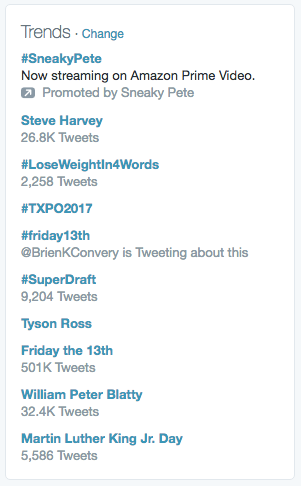
mentioned and Twitter detects this, a topic will become “trending” and it will
be featured on the side of the screen.
This allows “users to understanding what is happening in the world and
what people’s opinions are about it” (Wikipedia).
Both
hashtags and trending topics, would be significant advantages over reasons to
use Twitter over other social media platforms for a business. Why?
This is because it allows a business to see not only what is currently “in”
and perhaps to cash in on the event to gain notoriety/increased branding, but
it alerts them to moves of competitors/themselves and how that is being
perceived. For example, if I was
Southwest Airlines, and I see #UnitedBreaksGuitars in trending, I’m going to be
curious as to why my competitor United is being mentioned in a trending topic. Upon seeing that it is for a negative reason
(United has broken a person’s guitar) it is our opportunity to gain brand
recognition by tweeting something to the effect of, “Don’t worry, Southwest
doesn’t break guitars”. This is just one
of many scenarios where the unique features of Twitter shine through for
businesses.

My Experience
Twitter
was a learning experience for me, as I had never used the app prior to this
course. However, upon further
inspection, it’s very similar to other forms of social media previously talked
about here on the blog, with a few minor changes and quirks that make it stand
out. Twitter connects its users not just
through mutual friends and life occurrences, like Facebook, but its true
purpose is to instead invite friends and strangers to talk about topics trending
in the world today. That is where I
believe Twitter really shines through.
Now,
is Twitter a game changer when compared to the rest of the competition for
businesses? No. But when one thinks about it, none of the
social media platforms are necessarily useful on their own, due to the vast quantity
available to use. Twitter is just one
channel or tool a business should have in its toolbox to interact with its
customers, users, and professionals in the field. Much like certain tools are for certain jobs,
Twitter is just one tool for a certain job, the previous example concerning
United Airlines comes to mind. However,
by having all the tools at their disposal, Twitter becomes one tool of many,
ready to be deployed and utilized in a variety of situations as necessary. That is where the value for not only Twitter,
but all the previously talked about apps shine through for a business.

Sources/ Additional Research
Dugan, Lauren. “7 Ways Businesses Can Use Twitter.” Adweek, Adweek, 8 Mar. 2012, www.adweek.com/digital/7-ways-businesses-can-use-twitter/.
“Twitter for Business | Twitter Tips, Tools, and Best Practices.” Twitter, Twitter, business.twitter.com/en.html.
“Twitter.” Wikipedia, Wikimedia Foundation, 16 May 2018, en.wikipedia.org/wiki/Twitter.